Data Sorting in SurveyJS Dashboard
Sorting is an interactive feature that allows users to reorder answers based on response count, either in ascending or descending order.
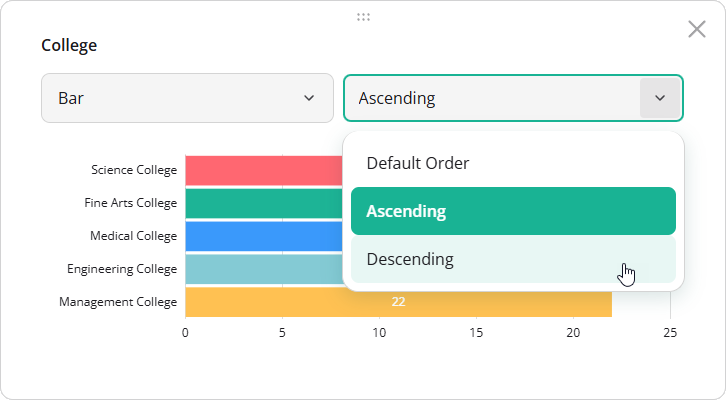
By default, answers are displayed in the order defined in the survey JSON schema.
Supported Visualization Types
Sorting is available for the following visualization types:
Enable or Disable Sorting
Sorting is enabled by default. To disable it for the entire dashboard, set the allowSortAnswers property to false when creating a Dashboard instance:
import { Dashboard } from "survey-analytics";

const dashboard = new Dashboard({
  questions: [ /* Survey questions to visualize */ ],
  data: [ /* Survey responses to aggregate */ ],
  items: [ /* Dashboard item configurations */ ],
  allowSortAnswers: false // Disables sorting globally
});
To override this setting for a specific dashboard item, configure the allowSortAnswers property in its visualizer object. Item-level settings take precedence over the global configuration.
import { Dashboard } from "survey-analytics";

const dashboard = new Dashboard({
  questions: [ /* ... */ ],
  data: [ /* ... */ ],
  allowSortAnswers: false, // Disable sorting globally
  items: [
    {
      name: "question1",
      visualizer: {
        allowSortAnswers: true // Re-enable sorting for this item
      }
    },
    // ...
  ]
});
Apply Sorting Programmatically
To define a sort order in code, set the answersOrder property to "asc" or "desc". You can specify this property globally in the IDashboardOptions configuration object or override it for individual dashboard items via the visualizer object. Item-level settings take precedence.
import { Dashboard } from "survey-analytics";

const dashboard = new Dashboard({
  questions: [ /* ... */ ],
  data: [ /* ... */ ],
  answersOrder: "asc", // Apply ascending sort globally
  items: [
    {
      name: "question1",
      visualizer: {
        answersOrder: "desc" // Override with descending sort for this item
      }
    },
    // ...
  ]
});
Other Interactive UI Features
Send feedback to the SurveyJS team
Need help? Visit our support page