Legend-Based Series Toggling

Legend-based series toggling is an interactive feature that allows users to show or hide individual data series in multi-series charts by clicking legend items. This is useful when charts display multiple series and users need to focus on specific data or reduce visual clutter.
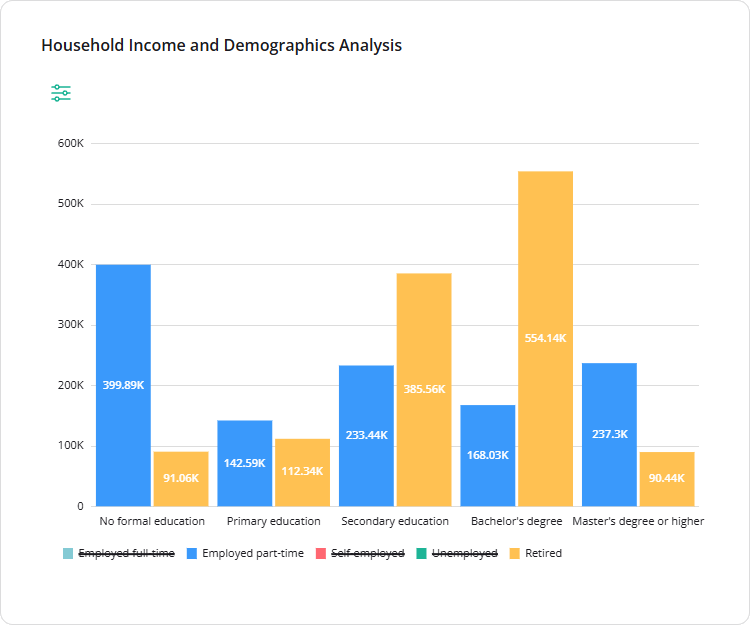
Chart legend with hidden series

View Demo

Supported Visualization Types

Configure the Legend

Series toggling is enabled by default and cannot be disabled. You can, however, change the legend position for better layout.

By default, the legend is displayed on the right. To reposition it, set the legendPosition property to "left", "top", or "bottom". You can apply this setting globally when creating a Dashboard instance or override it for individual items via the visualizer object:

import { Dashboard } from "survey-analytics";

const dashboard = new Dashboard({
  questions: [ /* ... */ ],
  data: [ /* ... */ ],
  legendPosition: "bottom", // Apply globally
  items: [
    {
      name: "question1",
      type: "stackedbar",
      visualizer: {
        legendPosition: "right" // Override for this item
      }
    },
    // ...
  ]
});

Other Interactive UI Features

Send feedback to the SurveyJS team

Need help? Visit our support page

Your cookie settings

We use cookies to make your browsing experience more convenient and personal. Some cookies are essential, while others help us analyse traffic. Your personal data and cookies may be used for ad personalization. By clicking “Accept All”, you consent to the use of all cookies as described in our Terms of Use and Privacy Statement. You can manage your preferences in “Cookie settings.”

Your renewal subscription expires soon.

Since the license is perpetual, you will still have permanent access to the product versions released within the first 12 month of the original purchase date.

If you wish to continue receiving technical support from our Help Desk specialists and maintain access to the latest product updates, make sure to renew your subscription by clicking the "Renew" button below.

Your renewal subscription has expired.

Since the license is perpetual, you will still have permanent access to the product versions released within the first 12 month of the original purchase date.

If you wish to continue receiving technical support from our Help Desk specialists and maintain access to the latest product updates, make sure to renew your subscription by clicking the "Renew" button below.